LUXEA Free Video Editor7.1.3
Publisher Description
Free and easy video editing.
LUXEA Free Video Editor is simple and easy-to-use video editing software loaded with all the basics for constructing memorable videos, plus some extras including a screen webcam recorder, customizable editing workspace, and the ability to upload directly to YouTube and Vimeo in-app. Created for video editing enthusiasts, LUXEA Free will boost your footage from rough cut to finished version.
Record
LUXEA Free includes a full-featured video recorder to help you record exactly what you want, making it perfect for video tutorials or vlogging. You can record your entire screen or specify a target area, as well as use your webcam, microphone, system audio, or any recording input combination. You can also add visual and audio cursor effects to your screen recording, so your audience can easily follow along. Set the recorder to automatically stop recording based on recording time or file size.
Edit
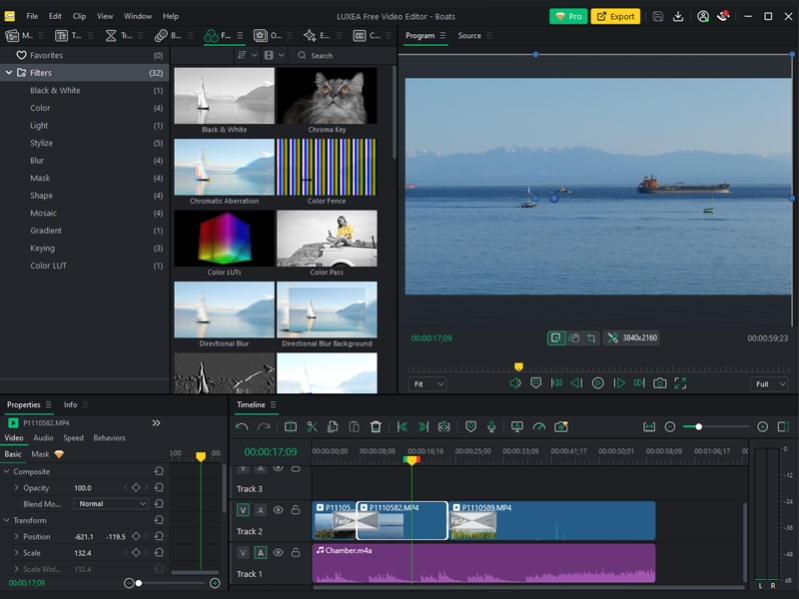
Add video, image, and audio files to the timeline and layer them on as many tracks as you'd like to bring your video content to life. You can split, trim, cut, copy and paste your media for a simple sequence, or create something more complex by using keyframes to set media properties like opacity, position and size. You can also apply a variety of filters to correct color or use creative overlays to give your scene more visual interest. Choose from a list of transitions to seamlessly go from clip to clip or animate your media using behaviors. LUXEA Free has all the tools you need to create content that stands out against the feed.
Produce Share
Use the Export Tool in LUXEA Free to produce videos up to 1080p in popular formats like MP4 and MOV. Upload directly to YouTube and Vimeo in-app for quick and easy sharing. You can choose to export only a portion of your timeline sequence, as a teaser or preview, or produce your video in its entirety. The Export Tool adds a watermarked LUXEA Free intro and outro to your video.
About LUXEA Free Video Editor
This Video Tools program is available in English, French, German. It was last updated on 29 September, 2026. LUXEA Free Video Editor is compatible with the following operating systems: Windows.
The company that develops LUXEA Free Video Editor is ACD Systems International Inc.. The latest version released by its developer is 7.1.3.
The download we have available for LUXEA Free Video Editor has a file size of 415.2 MB. Just click the green Download button above to start the downloading process. The program is listed on our website since 2024-02-14 and was downloaded 124 times. We have already checked if the download link is safe, however for your own protection we recommend that you scan the downloaded software with your antivirus. Your antivirus may detect the LUXEA Free Video Editor as malware if the download link is broken.
How to install LUXEA Free Video Editor on your Windows device:
- Click on the Download button on our website. This will start the download from the website of the developer.
- Once the LUXEA Free Video Editor is downloaded click on it to start the setup process (assuming you are on a desktop computer).
- When the installation is finished you should be able to see and run the program.
Program Details
General
System requirements
Download information
Pricing
Version History
version 7.1.3
posted on 2024-02-14
Added Japanese language support.
Fixed an issue causing the parent folder of a custom install location to be deleted when LUXEA is uninstalled.
In non-English languages, fixed an issue causing application text to be in English when LUXEA is installed to certain custom install locations.
And more!
version 7.1.1
posted on 2023-08-25
Import video, audio, images; split, trim, cut, copy & paste media; place the clips on the multi-track timeline
Pre-edit clips using the Source panel without adding them to the main project timeline
Dynamically record and generate audio clips in sync with the timeline while playing video
And more!
version 7.11.129
posted on 2023-08-25
Screen and webcam recording: Record your webcam, screen, microphone, system audio, or any combination. Create high-quality, real-time recordings with zero rendering time.
version 7.1
posted on 2023-07-19
Added the ability to turn off Maintain Audio Pitch when applying Speed Ramping
Added a graphic in the Source monitor when playing and pre-editing audio
Export Templates and Text Presets from Luxea 6 are automatically imported when LUXEA Pro 7 is first run
German and French localization
Bug fixes
version 7
posted on 2023-06-14
Video Recorder:
New GUI design
Auto stop function
The ability to dynamically record and generate audio clips in sync with the timeline while playing video
Video Editor:
New GUI design
The ability to customize the workspace, save and manage multiple workspaces
Elements pane
And more!
version 6.1.1
posted on 2023-01-18
Fixed an issue with the Purchase page not displaying correctly.
version 6.1.0.1859
posted on 2022-03-16
Replaced the applications embedded web browser with Microsoft Edge WebView2.
Fixed an issue where the option to share link on Twitter when uploading a video to YouTube or Vimeo did not prepare the Tweet properly.
version 6.0.1.1575.1
posted on 2021-05-20
Added the ability to set recording duration.
Added markers in timeline, including the ability to set a title, description and color.
Fixed: Luxea crashes when removing a freeze frame after an undo operation, which resulted in deleting the adjusted clip speed value.
Other fixes and improvements.
version 5.1.0.1404
posted on 2020-08-12
Ability to disable the snapshot sound
Ability to remove all gaps in a track
Added Fade with Luminance transition and 3 Linear transitions
Added Chromatic Aberration, Replace Color, Jigsaw, and Linear Gradient filters
Ability to import fonts with Content Packs
